Choosing a tech stack for your project is a very important step that defines many qualities of your future mobile app. Yet, the choice of the right mobile app tech stack can be overwhelming for non-tech specialists.
Rightfully so, as the wide range of choice of programming languages, technologies, and integration can be perplexing even for a specialist with a tech background.
With versatile experience as a Tech Lead, iOS Software Engineer, and Engineering Manager, I have a deep understanding of how different technologies affect an app's success.
So in this guide, I’ll share the different types of mobile stacks and how to choose the right one for your app.
Let’s get into it!
What is a Mobile App Tech Stack?
The term mobile app technology stack, or mobile app tech stack, refers to a combination of programming languages, platforms, frameworks, tools, UX/UI software, and other technologies required to develop a functional mobile app.
The main layers of a mobile app tech stack
The mobile stack can be categorized into these components:
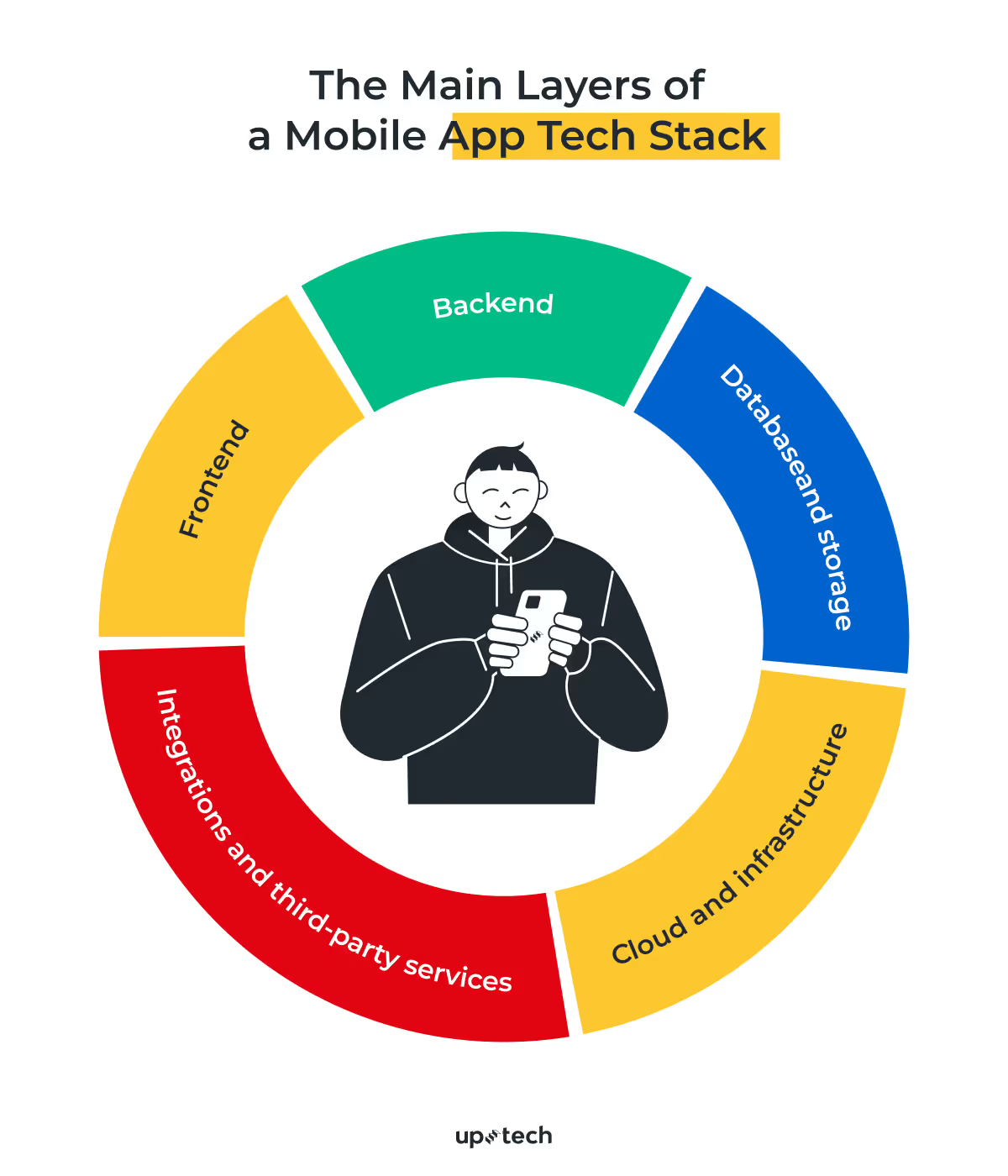
- Frontend. Technologies that are used to develop the interface that interacts with end-users directly. This layer handles UI, animations, navigation, and user input.
- Backend. Tools and software needed to create the underlying processing on the server. The backend processes requests, applies business logic, and talks to databases and third-party services. This is where authentication, payments, notifications, and core logic live.
- Database and storage. Systems used to store, manage, and retrieve application data. This includes structured data (such as user profiles and transactions), unstructured data (files, images, documents), and caching layers for performance optimization.
- Cloud and infrastructure. Services that host the app and provide scalability. This layer covers cloud platforms, deployment pipelines, server configuration, monitoring, and scaling mechanisms.
- Integrations and third-party services. External tools and APIs that extend app functionality without building everything from scratch. These may include analytics, push notifications, payment gateways, mapping services, authentication providers, or AI-powered features.
There are many variables to consider when choosing a mobile app development tech stack. However, there’s no single “best” option. Your choice depends on the platform your app targets: iOS, Android, or both, time to market, budget, security, or compliance requirements (especially in healthcare or fintech).
With that context in mind, let’s look at how this plays out on Android specifically.
Frontend Technology Stack for Android apps
If you’re building a mobile app for Android, the frontend layer relies on a fairly well-defined set of core technologies. While the Android ecosystem continues to evolve, these tools form the backbone of most Android applications running in production today.
This stack covers everything that lives on the user’s device: application logic, UI, build tooling, and testing environments.
Programming languages for Android apps
- Java. Java was the original core language for Android and is still widely used, especially in legacy projects. The language is well-supported and highly scalable: you’ll have a wide range of tools and libraries to choose from that are mostly open-source. While newer projects typically favor Kotlin, Java remains relevant for maintaining and extending existing Android applications.
- Kotlin. Since its launch in 2011, Kotlin has become a favorite amongst app developers and, more so, was declared the second official Android development language by Google. It’s concise, expressive, and designed to reduce boilerplate code, which helps teams move faster and make fewer errors. Kotlin integrates with Android SDKs and works fully alongside Java, making it the default choice for most new Android apps.
- C++ (via Android NDK). C++ is used selectively for performance-critical parts of an app, such as graphics processing, real-time computation, or game engines. It’s rarely used for full app development but can be integrated when low-level performance is a priority.
Android app development tools
Before diving into specific tools, it’s important to clarify the difference between programming languages and development tools.
,Programming languages, such as Kotlin or Java, define what the app does — they’re used to implement the application’s logic and behavior.
Development tools, on the other hand, define how the app is built, tested, and prepared for release. They support code writing, dependency management, build automation, device testing, and app packaging.
- Android Studio. Android Studio is the official integrated development environment (IDE) for Android. It provides everything needed to build Android apps, including code editing, UI design tools, emulators, profilers, and debugging utilities. Most Android projects are developed entirely within Android Studio.
- Android SDK. The Android Software Development Kit includes the core libraries, APIs, and system components required to build Android applications. It gives developers access to platform features such as device hardware, sensors, notifications, storage, and background services.
- Gradle. Gradle is the primary build automation tool for Android apps. It manages dependencies, handles different build configurations, and automates tasks such as compiling, testing, and packaging the app for release.
- Android Emulator. The Android Emulator allows developers to run and test apps on virtual Android devices with different screen sizes, OS versions, and hardware configurations. It’s essential for early testing and debugging before deploying to physical devices.
UI frameworks for Android mobile apps
- Jetpack Compose. It is the modern, officially recommended UI framework for Android. Jetpack Compose uses a declarative approach, meaning the UI is described as a function of the app’s state. This simplifies UI updates and makes complex interfaces easier to maintain. Compose integrates tightly with Kotlin and is increasingly the default choice for new Android apps.
- Android UI. The traditional Android UI framework is based on XML layout files combined with Views and ViewGroups. It provides pre-built templates that are handy for developers to build user interfaces quickly. While this approach is still widely used, especially in existing apps, it requires more manual state handling compared to Compose. Many production apps still rely on it, often alongside newer frameworks.
Frontend Technology Stack for iOS apps
If you’re building a mobile app for iOS, the technology landscape is more compact and tightly controlled than Android. Apple defines the rules, the tools, and the preferred paths forward. And while that limits flexibility, it also creates consistency across the ecosystem.
Programming languages for iOS apps
- Objective-C. It’s the original language used to build the iOS app, and Apple is still providing support for it. Nevertheless, building an app with Objective-C isn’t easy, and developers are prone to making mistakes.
- Swift. Swift is a relatively newer language introduced in 2014, and developers are favoring it over Objective-C. Thanks to its safer syntax, fewer mistakes are made, and apps are developed much more quickly. It’s also easier to find developers adept in Swift, as it’s easier to learn and master.
In practice, most modern iOS apps are built primarily with Swift, with Objective-C appearing mainly in legacy or long-lived products.
iOS mobile development tools
- Xcode. XCode is the official development tool by Apple, and it’s your go-to platform whether you’re using Swift or Objective-C. It has all the features needed to build a native iOS mobile app, including a visual interface builder.
- AppCode. Developed by a 3rd party, AppCode is an open-source alternative to XCode. While it enables iOS mobile app development, AppCode lacks the features of XCode and to an extent, is still dependent on the latter.
- iOS SDK. The iOS Software Development Kit provides the core frameworks and APIs required to build iOS applications. It gives developers access to system features such as user interface components, device hardware, networking, storage, and security services.
UI frameworks for iOS mobile apps
iOS development currently supports both modern declarative UI frameworks and traditional, imperative approaches, which often coexist in real-world projects.
- UIKit. UIKit is the core framework for building graphical user interface components in iOS apps. It contains templates defining the UI elements that form the building blocks of the app.
- SwiftUI. SwiftUI is a newer framework that offers a more efficient way of designing UI elements in iOS apps. However, it only works on iOS 13 and above, and there are limited resources since it was launched in 2019.
Frontend Cross-platform Technology Stack
Cross-platform development exists for a very practical reason: speed. When time to market and budget efficiency matter more than platform-specific perfection, shared codebases can dramatically simplify the development process.
Instead of building and maintaining two separate apps for iOS and Android, cross-platform tools allow teams to write one codebase and deploy it across both platforms.
Here are the most common tools used today.
Programming tools
- React Native (JavaScript or Typescript). React Native is arguably the top favorite amongst developers for developing a cross-platform app. It is based on JavaScript and offers fundamental building blocks that work on both platforms.
- Flutter (Dart). Flutter is Google’s answer to a cross-platform development tool. It features a ’hot reload’ that prevents wasted time on emulators and simulators while its expressive widget promises native performance.
- Xamarin (C#). Developers proficient in C# will find Xamarin a natural choice for building cross-platform apps. Codes written in C# are cross-compiled to native programs for Android and iOS.
Cross-platform apps are popular because they reduce time-to-market while keeping development costs low. However, the downside of doing so is that you’re limited to the functionalities allowed by the toolkit. Some device-specific features are not accessible with cross-platform development.
Backend Technology Stack
The back-end, which handles business logic, authentications, data management, and processes crucial to the app, requires a different technology set. Backend technology stack includes the choice of hosting provider, database, programming languages, and frameworks.
Programming languages and frameworks
Backend development typically uses stable, scalable server-side languages and frameworks:
- Node.js with frameworks like NestJS or Express
- Python with Django or FastAPI
- Java with Spring Boot
- .NET for enterprise-grade systems
The choice depends on performance needs, team expertise, and system complexity.
APIs and communication
The backend exposes functionality to the mobile app through APIs:
- REST APIs for standard request–response interactions
- GraphQL for flexible data querying and reduced over-fetching
- WebSockets for real-time features such as chat or live updates
Authentication and authorization
This layer manages user identity, access control, and security:
- OAuth 2.0, OpenID Connect
- Token-based authentication (JWT)
- Role-based access control
Business logic and services
Core application logic lives on the backend, including workflows, validation rules, notifications, and integrations with payment systems, messaging services, or third-party APIs.
Background jobs and messaging
Asynchronous processing improves performance and reliability:
- Message queues (Kafka, RabbitMQ, SQS)
- Background workers and schedulers
Security and compliance
Backend systems enforce encryption, data protection, logging, and audit trails. This is especially critical for healthcare, fintech, and other regulated industries.

How to Choose the Mobile App Tech Stack?
It’s impossible to suggest a unified mobile app technology stack for all projects. Every app is unique and has its own requirements.
The same applies to your startup and the team that’s developing the app. Instead of blindly copying the mobile app tech stack used by other apps, you’ll want to start by asking important questions:
Is the technology mature enough for your target audience?
Some tools come with platform or OS limitations. For example, SwiftUI only supports iOS 13 and later. If your product needs to reach users on older iOS versions, SwiftUI alone may not be a viable choice. Newer frameworks often move fast, but they can lag in backward compatibility, documentation, or long-term stability.
What is your team actually good at?
Your tech stack should reflect the real strengths of your development team, not aspirational skills. Choosing tools that your engineers aren’t proficient in increases ramp-up time, introduces avoidable risks, and can slow delivery. A slightly less “trendy” stack that your team knows well often leads to better outcomes.
How flexible and extensible is the stack?
Consider how easily the stack integrates with third-party services, APIs, analytics tools, and infrastructure. A narrowly scoped toolkit can limit future growth, especially once you start adding payments, authentication, analytics, or AI-driven features.
Ideally, your mobile app tech stack should strike a balance between flexibility and reliability—robust enough to support future growth, but familiar enough for your team to work efficiently from day one.
Factors to consider when choosing a mobile technology stack
Here are more factors to consider when choosing a mobile tech stack.

Mobile app’s goal
What you’re trying to achieve with the app will determine the choice of the mobile app tech stack. If you’re trying to reach both iOS and Android users as quickly as possible and performance isn’t critical, you’ll want to go with cross-platform tech stacks.
Apps like Facebook Ads Manager are built with React Native.
However, if you’re building apps that require device-specific APIs like HealthKit, Samsung Health, or ARKit, you’ll need to write native code in a ReactNative app to work with native kits or use a third-party framework. But we can't rely on it 100% to develop the app with native toolkits.
Scalability
While you’ll be focusing on delivering the primary features in the early stage, you’ll want to plan for scalability when the app grows. This means choosing a mobile app tech stack that isn’t restrictive when it’s time for growth.
You’ll need to focus on technologies that support a stable system architecture as user and traffic volumes increase. Your choice of server, hosting provider, database, and even programming languages can mean hitting a bottleneck or seamless operation when you expand the app.

Security
Security is crucial regardless of which platforms you’re building the app on. You can’t afford to be complacent, as malicious attackers could manipulate the slightest vulnerabilities.
Thankfully, every popular mobile app technology is built with the necessary security features. The problem is choosing one that is properly documented and with a leaner, cleaner framework. It’s also a good practice to select a toolkit that doesn’t require writing lengthy code.
Complexity
Complexity has a different meaning for developers. Just because an app has many UI elements, it doesn’t mean it’s complex. Instead, complexity reflects how the app interacts with the underlying mobile features and communicates with the backend.
If you’re building an app that requires data caching or receives data from the phone’s sensors and camera, you’ll need to opt for native mobile stacks. Native app technology allows you to access features specific to the device, which isn’t possible if you’re building in a cross-platform environment.
However, if the app is as simple as displaying data that it receives from the backend, you’ll have a better advantage of using a cross-platform solution. Instagram, which serves as an image and video-sharing social media, is built with React Native.
While it’s possible to build a complex app with cross-platform tools, you’ll need native development to complete the modules involving the phone’s hardware.
Development timeline
In November 2025, around 41,300 new Android apps were launched on the Google Play Store. That shows how competitive the industry is, and it’s important to choose mobile development technologies that suit the development timeline.
If you’re building an MVP, you’ll need tools to get the app ready in weeks and not months. However, the full version of the app may be developed with tools that allow for more features, but with a longer timeline.
Cross-Platform vs. Native App Development Tech Stack
Depending on your project’s needs, you will choose between cross-platform and native app development. While native app development means building a separate app for each Android and iOS platform, the cross-platform option means building a universal one that fits both.
If you want to learn more about the difference between cross-platform and native app development, as well as their benefits, check our blog post article “Native Vs Cross-Platform Development: How To Choose?”.
In that article, we discuss in more detail how the mobile app stacks for these two options will differ. So let’s see the technologies used for both.
When cross-platform development makes sense
Cross-platform development is primarily a strategic choice about speed, cost, and reach. It works best when your product goals align with shared code, predictable feature sets, and a faster path to market.
This approach makes sense in the following scenarios:
Early-stage products and MVPs
If your priority is validating an idea quickly, cross-platform frameworks allow teams to ship a working product to both iOS and Android without maintaining two separate codebases. This reduces development time and cost while enabling faster feedback from real users.
Startups with limited budgets or small teams
For teams that can’t afford parallel native development, cross-platform development provides broader platform coverage with fewer engineering resources. A single team can move faster without sacrificing baseline app quality.
Apps with standard functionality
Products built around common patterns — user accounts, content feeds, forms, dashboards, basic media handling — are well suited for cross-platform frameworks. In these cases, the abstraction layers provided by tools like React Native or Flutter rarely become a constraint.
Tight time-to-market requirements
When launching quickly is a competitive advantage, cross-platform development helps teams deliver faster. Shared business logic and UI components reduce duplication and simplify iteration in the early stages.
Products expected to grow or pivot
If your roadmap is uncertain, cross-platform development offers flexibility. You can validate assumptions, adjust features, or even change direction without committing early to heavy platform-specific investment.
That said, cross-platform development is not a shortcut to avoid technical decisions. As a product matures, limitations may surface around performance tuning, advanced animations, or deep OS integrations. Many teams start with a cross-platform approach and later introduce native components — or migrate fully — once product requirements become clearer.
In practice, cross-platform development works best when speed and reach matter more than deep platform control, especially in the early and mid stages of a product’s lifecycle.
Choosing a Mobile Development Stack with Uptech
At Uptech, we build mobile products using open, well-supported technologies with strong ecosystems. This approach allows our teams to move fast at the MVP stage, validate ideas in real market conditions, and avoid early technical lock-ins.
We deliberately choose mobile app tech stacks that are not only efficient for rapid development, but also scalable and future-proof.
As products evolve, these stacks make it easier to extend functionality, improve performance, and adapt the app without costly rewrites. Using widely adopted technologies also helps us maintain and grow products over time, as teams can rely on proven tools and long-term platform support.
Since 2016, Uptech has helped businesses choose mobile app technology stacks that deliver stable performance, strong user experience, and reliable scalability. This isn’t just a theoretical approach — it’s reflected in real production apps.
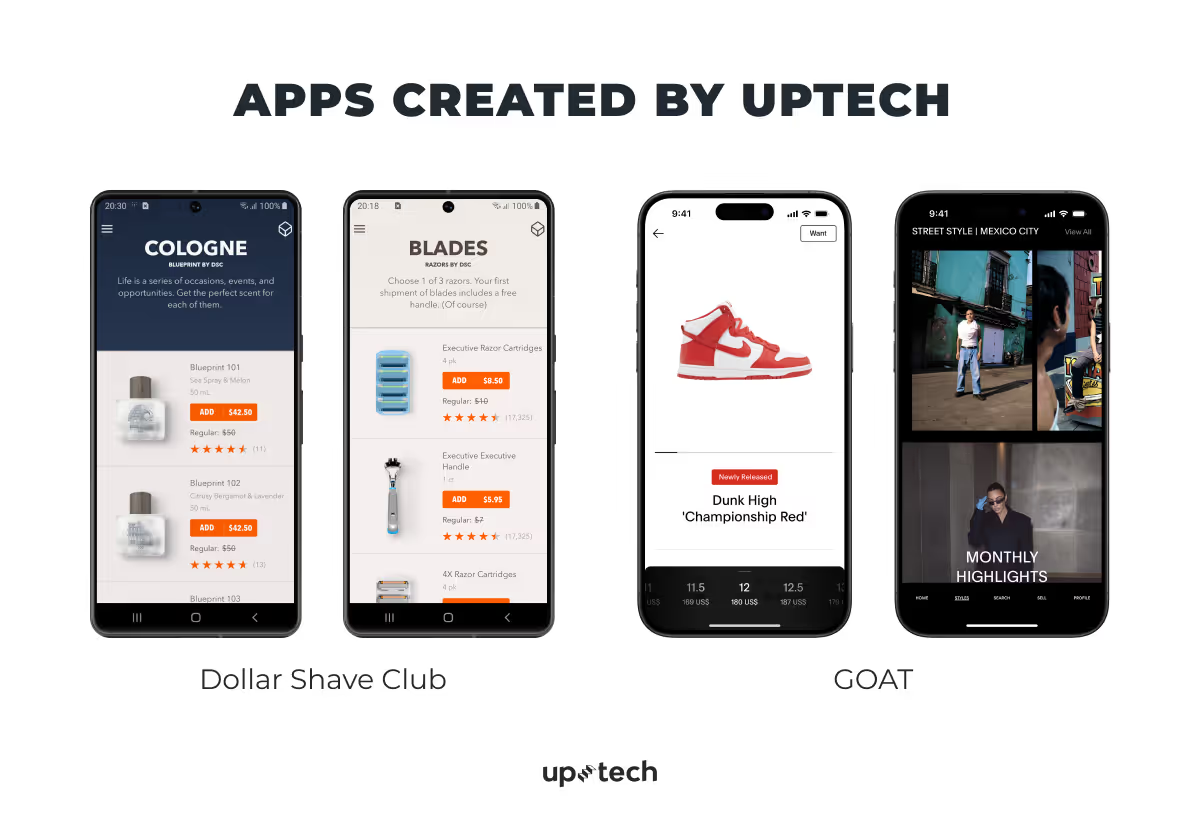
For example, we’ve worked on:
- Dollar Shave Club, supporting a high-traffic consumer app where performance, reliability, and smooth user experience are critical
- GOAT, contributing to a large-scale marketplace product that requires robust architecture and consistent performance under load.
If you’re curious about how our technical decisions translate into real-world stability, you can also explore our blog article on how Uptech achieved 99% crash-free sessions for the Aspiration app.
Summary
The right mobile app tech stack for your Android or iOS app is crucial to how the product will function and scale. Choosing the mobile stack for a project can be tricky, especially if you need the proper tech background.
An experienced technology partner offering mobile app development services can help you select a tech stack that aligns with your business goals and growth plans. Taking the time to choose a partner you trust is an investment in the long-term success of your product.
Ready to discuss your mobile app?
Contact us to explore the right tech stack for your project.


























.avif)